Best WiFi Extenders for Thick Brick Walls in 2026 — UK Buyer’s Guide
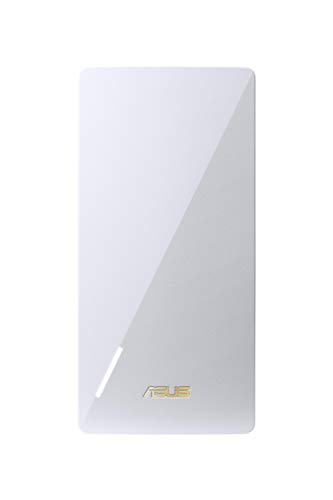
- Best overall: ASUS RP-AX58 AX3000 Dual Band WiFi 6 (802.11ax) Range — Its AX3000 Wi‑Fi 6 class and 160MHz 5GHz bandwidth give it the best raw headroom here for
- Runner-up: TP-Link Repeater RE605X — It combines Wi‑Fi 6, OneMesh support and a Gigabit Ethernet port, making it the most round
- Third choice: WIFI NETGEAR REPETEUR UNIVERSEL WIFI AC2200 — Its AC2200 rating puts it above entry-level extenders, and the 2200 Mbit/s figure suggests
Thick brick walls are brutal on Wi-Fi because they soak up signal, especially on 5GHz, and they can turn a decent broadband line into a useless room-by-room lottery. The right extender won’t fix a bad router, but it can push a usable connection into the bedrooms, loft, or back office where brick is killing the coverage.
This guide compares four real options with the figures that matter: Wi‑Fi 6 support, AX3000 or AX1800 class ratings, Gigabit Ethernet, and whether they offer mesh-style setup or access point mode. It is for UK buyers who want a practical fix for stubborn walls, not marketing fluff.
| Product | Price | Size | Color | |
|---|---|---|---|---|
| ASUS RP-AX58 AX3000 Dual Band WiFi 6 (802.11ax) Range 🥇 Top Pick |
— | Wi-FI 6 – AX3000 | white | Check price |
| TP-Link Repeater RE605X 🥈 Runner-Up |
£75-£100 | WiFi 6|AX1800 Mesh | Black | Check price |
| WIFI NETGEAR REPETEUR UNIVERSEL WIFI AC2200 🥉 Third Place |
— | 2200 Mbit/s | White | Check price |
| TP-Link RE315 AC1200 WiFi Extender Booster WiFi Booster 4th |
£20-£30 | — | — | Check price |
Specifications from Amazon product data. Price bands are a rough guide only — check the current price on Amazon before buying.
Our Top Picks
—
ASUS RP-AX58 AX3000 Dual Band WiFi 6 (802.11ax) Range
“Its AX3000 Wi‑Fi 6 class and 160MHz 5GHz bandwidth give it the best raw headroom here for pushing signal through difficult brick work.”
This is the most capable extender in the group on paper, thanks to Wi‑Fi 6 support and AX3000 class hardware. The 160MHz bandwidth on 5GHz is the standout detail, because it gives this model more headroom than older Wi‑Fi 5 units when you are trying to preserve speed after a brick wall has already knocked the signal down.
The downside is that the listing is thin on practical extras: there is no Ethernet port mentioned, no mesh-system claim beyond the general Wi‑Fi 6 pitch, and no concrete coverage figure to show how far it reaches. So while it looks best suited to tough homes, you are buying on capability rather than documented convenience features.
- Wi‑Fi 6 (802.11ax) support for better capacity and lower latency
- AX3000 class hardware gives it the strongest spec sheet in this shortlist
- 160MHz 5GHz bandwidth can help preserve speed after heavy wall loss
- No Ethernet port is listed, so wired kit cannot be connected directly
- The product data gives no coverage range or room count
- The listing is sparse on setup details compared with rival mesh-capable models
Best for: A buyer with very thick internal brick walls who wants the strongest spec sheet and is mainly focused on wireless performance.
💬 Verdict: Pick this if you want the best chance of recovering speed through difficult walls and can live without extra hardware details.
£75-£100
TP-Link Repeater RE605X

“It combines Wi‑Fi 6, OneMesh support and a Gigabit Ethernet port, making it the most rounded choice for a brick-heavy UK home.”
The RE605X is the best all-rounder here because it balances modern wireless tech with proper wired support. Wi‑Fi 6 should help with congestion, and the Gigabit Ethernet port is a real advantage if you want to hard-wire a TV, console or desktop in the room that sits behind the brick wall.
OneMesh compatibility is also useful if you already use a TP-Link OneMesh router, because it can make the coverage feel more seamless than a basic repeater. The weakness is that it is still an AX1800 device rather than the faster AX3000 class, so it does not have the same top-end headroom as the ASUS. The international-product note is another mild caution for UK buyers who want packaging and instructions fully aligned to local stock.
- Wi‑Fi 6 802.11ax for better speeds and reduced congestion
- Gigabit Ethernet port for a wired TV, console or PC
- OneMesh compatibility for more seamless coverage with a matching router
- AX1800 class is not as ambitious as AX3000
- International product note may mean different packaging or instructions
- Not the strongest raw spec for the hardest brick-wall cases
Best for: A UK buyer who wants the best mix of wireless improvement, wired flexibility and mesh-style convenience.
💬 Verdict: Choose this if you want the most practical everyday solution rather than the biggest headline spec.
—
WIFI NETGEAR REPETEUR UNIVERSEL WIFI AC2200

“Its AC2200 rating puts it above entry-level extenders, and the 2200 Mbit/s figure suggests decent capacity for a larger home.”
This NETGEAR repeater has a stronger-looking speed class than the basic AC1200 option, with a 2200 Mbit/s rating and a model description that points to a universal wireless signal repeater. That makes it worth considering if you want more than a budget extender but do not specifically need Wi‑Fi 6.
Its big drawback is age: the release date is 2016, which makes it the oldest model here by a wide margin. The listing also gives almost no useful detail beyond the 2200 Mbit/s class and a note that it is easy to use, so it is hard to judge how well it will behave through thick brick walls compared with newer Wi‑Fi 6 rivals. The odd unit count of 2 on the data is also unclear from a buyer’s point of view.
- AC2200 class is stronger on paper than basic AC1200 extenders
- 2200 Mbit/s figure suggests decent overall capacity
- Universal repeater format should be broadly compatible
- Released in 2016, so it is much older than the Wi‑Fi 6 options
- Very little detailed technical information is provided
- No Ethernet port or mesh feature is listed
Best for: A buyer who wants a higher-capacity repeater than entry-level kit and does not need the newest wireless standard.
💬 Verdict: Worth a look only if you are happy to trade modern features for a higher AC class.
£20-£30
TP-Link RE315 AC1200 WiFi Extender Booster WiFi Booster

“It is the simplest budget option in the line-up, and the AC1200 class is enough for basic extension in lighter-duty setups.”
The RE315 is the no-frills choice here. AC1200 is fine for bringing a weak signal into another room, and for a small home with only one or two problem walls it may do the job without much fuss. The appeal is simplicity: it is the kind of extender you buy when you just want to improve a dead spot.
The limitation is obvious: there are no listed features or specs beyond the model name, so you are getting very little to go on. That makes it the least convincing option for thick brick walls, where you normally want stronger standards such as Wi‑Fi 6, clearer capacity figures, or at least a Gigabit Ethernet port. It may be cheap by design, but it is also the easiest one to outgrow.
- AC1200 can still be enough for basic room-to-room extension
- Straightforward extender format suits simple setups
- Low-spec design may appeal if the need is only modest
- No features are listed in the supplied data
- No specs are listed in the supplied data
- Not the best match for very thick brick walls
Best for: A buyer with only mild coverage issues and the lowest performance expectations.
💬 Verdict: A basic fix, but not the one I would choose for a stubborn brick-built house.
What to Look For — Buyer’s Guide
What to Look For
For thick brick walls, start with the wireless standard. Wi‑Fi 6 models such as AX3000 or AX1800 tend to cope better with congestion and busy homes than older AC kit. The next thing to check is whether the extender has a Gigabit Ethernet port, because wired devices in the dead zone often benefit more from a cable than from another weak wireless hop. If you already use the same brand’s mesh system, look for compatibility such as OneMesh, since that can make roaming feel smoother across the house.
Also pay attention to the bits the listing actually gives you. A 160MHz 5GHz channel is a real advantage on paper, and an AC2200 or AX3000 rating gives you more headroom than AC1200. But be wary of vague listings with no port details, no coverage figures and no setup information, because those are often the ones that disappoint in older brick-built properties.
How Much Should You Spend?
For a simple dead spot, a budget AC1200 extender can be enough, but it is the least convincing option for thick walls. Mid-range Wi‑Fi 6 extenders with Ethernet, like the RE605X, are usually the sweet spot for UK homes because they combine better wireless handling with a practical wired port. If you want the strongest spec sheet and are mainly chasing wireless performance, the AX3000 class ASUS is the one to look at, but only if you are happy with the leaner feature list.
Our Verdict
The top pick is the ASUS RP-AX58 AX3000 Dual Band WiFi 6 (802.11ax) Range, because its AX3000 class and 160MHz 5GHz support give it the strongest raw spec for difficult brick-wall coverage. The runner-up is the TP-Link Repeater RE605X, which is the more practical all-round choice thanks to Wi‑Fi 6, OneMesh support and a Gigabit Ethernet port.
Frequently Asked Questions
Will a WiFi extender work through thick brick walls?
Yes, but not perfectly. Brick absorbs signal, so the extender needs a decent signal from the router in the first place and should be placed where it still receives a strong enough connection.
Is WiFi 6 better than AC for brick walls?
Usually yes. Wi‑Fi 6 models such as AX1800 or AX3000 tend to handle congestion and multiple devices better, which helps in homes where the walls already weaken the signal.
Where should I place a WiFi extender in a brick house?
Put it halfway between the router and the dead zone, not inside the dead zone itself. If the signal is already too weak there, the extender has nothing good to rebroadcast.
Do I need a mesh system instead of an extender?
If you want seamless roaming across a larger home, mesh is often better. But a good extender with features like OneMesh can still be a solid fix for one or two problem rooms.
Does an Ethernet port help with WiFi extenders?
Yes. A Gigabit Ethernet port lets you connect a TV, console or PC directly to the extender, which is especially useful when the room itself has poor wireless reception.